

How to Choose High Speed Optical Transceivers for AI Data Center Networks


Author
Driven by deep data center expertise, the X REACH Engineering Team provides high-performance server and AI cluster solutions tailored for enterprise stability. Utilizing our unique "in-stock + distribution" model and rigorous quality control, we ensure raUtilizing our unique "in-stock + distribution" model and rigorous quality control, we ensure
X REACH Engineering Team


Choose high speed optical transceivers by matching five things to your fabric: speed, reach, fiber type, form factor, and switch compatibility. The fastest port rarely wins. Accelerated computing workloads reward low latency, high port density, and predictable power budgets instead.
Start with the workload, then work outward. That order makes transceiver selection repeatable, and it keeps optical transceiver speed tied to real link distances rather than marketing. Every transceiver you add also changes rack power, cooling, and cabling infrastructure.
Plan density and migration early. A reliable partner such as X REACH LIMITED supplies matched optics and cabling, so your infrastructure stays consistent as you scale.
Key Takeaways
-
Match transceiver speed to the port role, not the highest number. Use 100G for access, 400G for spine, and 800G for uplinks.
-
Choose single-mode fiber for new AI builds. It reduces fiber count by four times and supports clean upgrades to 800G.
-
Test every module in breakout mode before deployment. Firmware limits cause most failures, especially in 800G to 4x100G splits.
-
Calculate per-port power draw for each rack. 800G modules add 14-18W, raising thermal load by 1.5 to 2 times.
Speed Tiers for High Speed AI Data Center Optical Transceivers
100G, 400G, and 800G Compared
Each speed tier serves a distinct role in the fabric. You deploy 100G at the leaf for server access and management links. You place 400G at the spine and for GPU interconnect within a rack. You reserve 800G for spine uplinks and inter-pod trunks that carry aggregated traffic.
The best choice matches workload, port type, and link distance. Raw speed alone tells you little. A 400G port that reaches 500 meters solves a different problem than one that reaches 2 kilometers.
|
Transceiver |
Fiber / Connector |
Maximum Reach |
|---|---|---|
|
400G-DR4 |
Single-mode / MPO-12 |
500 m |
|
400G-FR4 |
Single-mode / Duplex LC |
2 km |
That gap matters. You pick DR4 for in-row and adjacent-row runs. You pick FR4 when the link crosses a hall. Optical transceiver speed stays constant across both, yet reach dictates which module fits your layout.
Why AI Fabrics Push Toward 800G and 1.6T
AI training changes the bandwidth math. A single GPT-class training run can saturate 100G links thousands of times over. NVIDIA GPU clusters connect 100,000+ accelerators in one fabric. Each GPU requires 400–800 Gbps of interconnect bandwidth. Aggregate capacity reaches 80 petabits per second across such a cluster.
AI training requires 800G today and 1.6T by 2026, whereas 400G was sufficient for general cloud workloads.
Parameter server communication for gradient synchronization alone demands 3–5 Tb/s. All-reduce operations need simultaneous high-speed access to every node. Checkpoint storage and data pipeline feeding add continuous load. High Bandwidth Optical Transceivers absorb this pressure by packing more lanes per module.
The 1.6T rollout follows a clear sequence:
-
2025–2026: Early deployment and volume ramp, concentrated in AI training clusters and high-capacity spine layers.
-
2026–2027: Broader AI fabric adoption, with mixed 400G/800G/1.6T environments remaining common.
-
2027 and beyond: The roadmap points toward 3.2T modules, with OSFP-XD positioned for higher lane density.
Vendor momentum confirms the shift. Marvell shipped its 3nm Ara 1.6T PAM4 DSP in mass volume in March 2026. Cisco announced Silicon One G300 systems with 64 ports capable of 1.6T operation. Arista announced 64-port 1.6T platforms in the 7060XE7 family. Early 1.6T deployments carried premium pricing above $3,000 per unit.
Standards still trail hardware. As of July 2026, IEEE P802.3dj remained in Draft 3.1. Final publication is pending. Your procurement specs must therefore distinguish "designed to the current P802.3dj draft" from compliance with a final published standard. OSFP MSA Revision 5.1 includes OSFP1600 provisions, and OIF released CMIS 5.4 in May 2026.
Plan your infrastructure around this cadence. Buy 800G for today's AI clusters, and confirm that your switch silicon and cabling support a later 1.6T upgrade. That approach protects your infrastructure investment and preserves efficiency as network traffic grows.
Reach, Fiber, and Optical Transceivers for Data Center Networks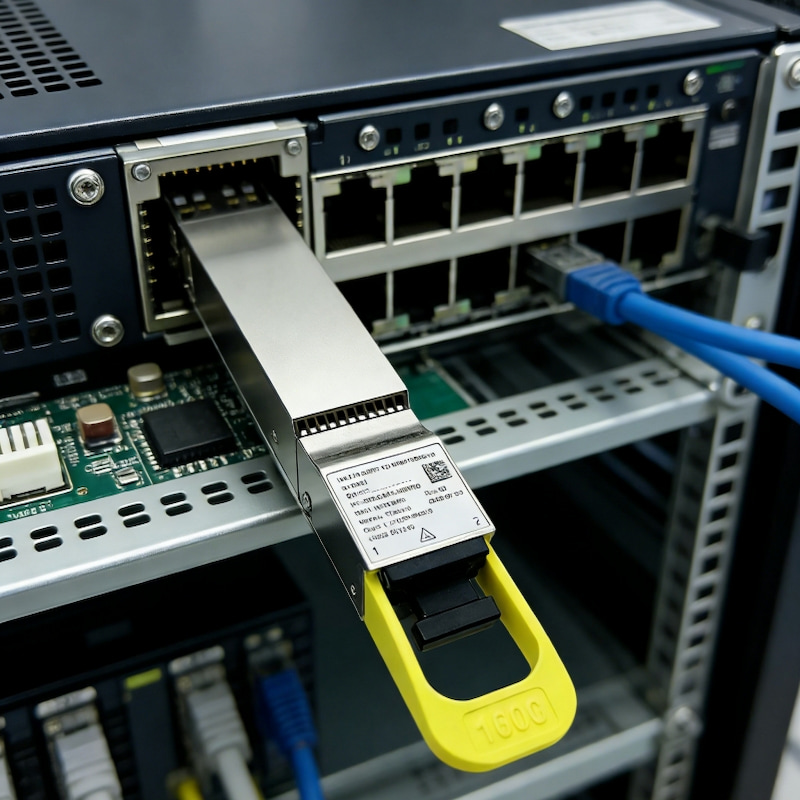
SR, DR, FR, and LR Reach Classes
Reach class tells you how far a link can run. At 400G, the four common classes cover very different distances.
|
Transceiver Type |
Maximum Supported Distance |
Fiber/Medium |
|---|---|---|
|
400G SR8 |
100 m |
OM3 multimode (MPO-16, 850 nm) |
|
400G DR4 |
500 m |
Single-mode (MPO-12, 1310 nm) |
|
400G FR4 |
2 km |
Single-mode (duplex LC, CWDM) |
|
400G LR4 |
10 km |
Single-mode (duplex LC, CWDM) |
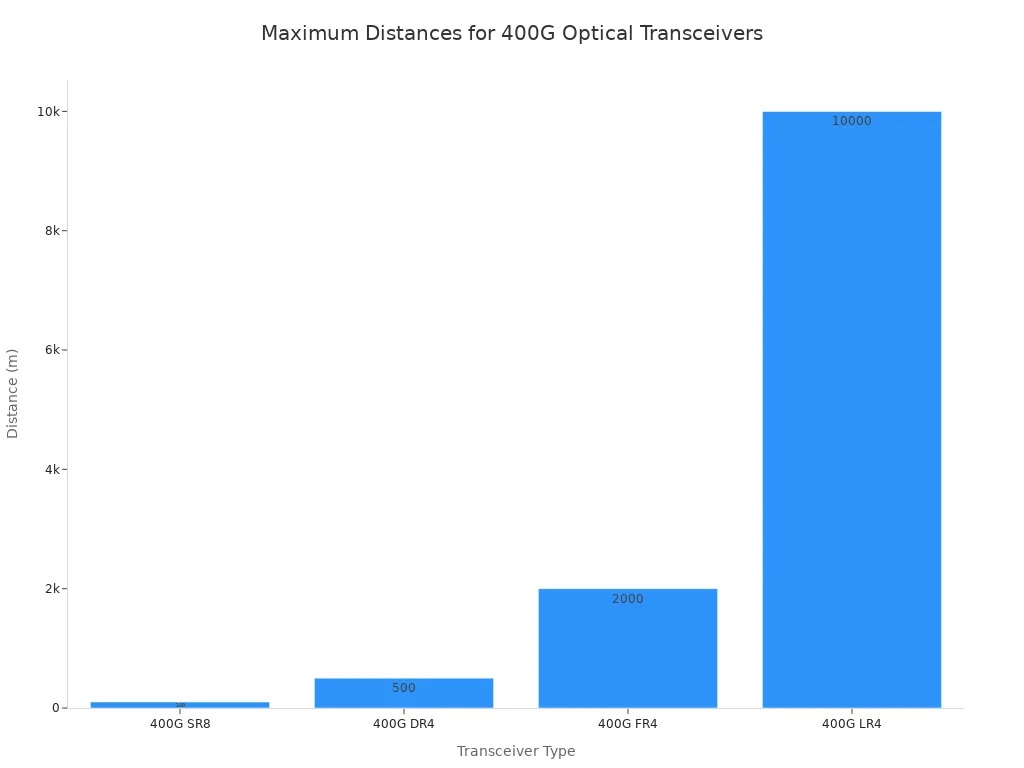
You pick SR8 for in-rack runs under 100 meters. DR4 handles leaf-to-spine links inside one hall. FR4 and LR4 serve longer paths, including building-to-building spans. Long Distance Optical Transceivers such as LR4 modules carry traffic across a campus without regeneration.
Single-Mode vs. Multimode and MPO Architecture
Single-mode fiber now dominates new AI builds. At 400G, SR8 uses 16 fibers through an MPO-16 connector. DR4 uses an MPO-12 connector, covering 500 meters over single-mode fiber. That reduction in fiber count shrinks cable bulk and simplifies MPO architecture.
Cost drives the decision too. A 400G SR8 module costs about $219, and a 400G DR4 costs about $549. Multimode wins on near-term optics price for short links. Single-mode wins when you plan for growth. The crossover point sits around 200–250 meters for 100G deployments. Beyond that, single-mode becomes both technically required and cheaper over time.
Your transceiver selection shapes topology scalability. Single-mode upgrades to 800G DR8 by doubling lanes. Multimode has no clean 800G path without new MPO-16 links. Plan your fiber infrastructure once, and you avoid a costly recabling project later.
Form Factor and Switch Compatibility
QSFP-DD, OSFP, and QSFP112
Form factor decides how much bandwidth fits on a faceplate and how much heat each port produces. QSFP-DD is a common form factor for 400G modules, while OSFP targets 800G and 1.6T with support defined in OSFP MSA Revision 5.1. QSFP112 is another 400G form factor using fewer, faster lanes. Match the form factor to your switch ASIC and your cooling design before you commit.
Port, Breakout, and Interoperability Checks
Breakout turns one 400G port into four 100G links. This pattern suits spine-to-leaf fan-out, GPU cluster expansion, and gradual 100G-to-400G migration. You need the right switch port profile, MPO breakout harnesses, compatible remote optics, and accurate lane mapping.
Validate every module against the switch vendor's compatibility matrix for your exact SKU and software version. Confirm the power class, and check that CMIS versions match between switch firmware and transceiver. Test breakout modes in a lab first. Low-cost modules often run fine at native 400G and then fail during breakout because of firmware or lane-mapping limits.
Compatibility varies by vendor and module. Treat transceiver selection as a compatibility exercise, not a speed contest, and your ai fabric will link up cleanly on the first attempt.
Power, Cooling, and Reliability in AI Networks
Power and Thermal Budgets per Port
Higher optical transceiver speed raises heat per module. 800G modules draw more power than 400G modules, which reshapes your rack budget. Per transmitted bit, 800G is more efficient, driving migration across AI clusters. Yet each module still adds heat you must remove.
Cooling capacity now limits rack density. Moving from 400G to 800G per-port power raises rack thermal load, so cooling built for 400G may not serve 800G.
Dust, Heat, and Mechanical Stress Risks
AI racks reach high power densities. GPU temperatures remain elevated for long periods. Your GPU Cluster Network Optical Transceivers must survive this. Port-side exhaust designs add thermal stress, and unstable airflow shrinks link margin.
|
Temperature Effect |
Impact on Optical Performance |
Reliability Implication |
|---|---|---|
|
Elevated temperature |
Reduced optical power output |
Lower link margin stability |
|
Temperature fluctuation |
Increased signal variation and jitter |
Higher BER risk |
|
Stable thermal control |
Consistent optical performance |
Extended module lifespan |
Heat also shifts laser wavelength. In WDM systems, that drift can push a signal outside the receiver filter window. BER then climbs, and the link may drop entirely.
Dust and mechanical stress compound the problem. Contaminated MPO end faces scatter light and cut margin. Repeated insertion wears connector ferrules. High-quality optics reduce dust, heat, and stress failures, protecting your infrastructure and performance over years of service.
Selection Framework and Common Mistakes
Step-by-Step Selection Order
A repeatable order keeps transceiver selection grounded in your fabric instead of a spec sheet. Work through these steps in sequence:
-
Define the workload. Identify whether the link serves GPU interconnect, spine aggregation, or storage. AI training clusters favor short, dense, low-latency links.
-
Set the speed. Match bandwidth to the port role, not to the highest number available.
-
Fix the reach. Measure the actual fiber run. Choose SR8 for multimode up to 100 m, DR8 for single-mode up to 500 m, and FR4 for single-mode up to 2 km.
-
Confirm the fiber plant. Switching between multimode and single-mode raises deployment cost sharply.
-
Pick the form factor. Verify OSFP or OSFP-XD support against your switch ASIC bandwidth.
-
Validate compatibility. Check the vendor list, confirm EEPROM coding, and test on real hardware before large-scale rollout.
-
Budget power and cooling. Add per-port wattage across every port in the rack.
-
Plan spares. Keep a modest pool per optic type.
This sequence protects your infrastructure budget and your deployment schedule.
Pitfalls That Derail AI Deployments
The cheapest module on a quote often costs the most over its life. Buying LR4 for a 1 km link purchases distance the network never uses and adds power draw at every port. The reverse error hurts too. A DR4 module on a span near 700 to 1000 meters can force redesigns or emergency replacements once margin disappears. Power compounds this. Even a small wattage increase multiplies across hundreds of ports.
Cabling mistakes are equally common. Watch for these:
-
Wrong MPO connector type. SR8 needs MPO-16, DR4 needs MPO-12.
-
Polarity mismatch.
-
Mating APC and UPC connectors.
-
Wrong connector gender. Transceivers use male MPO connectors. Patch cables must use female.
-
Improper breakout cabling for 800G links.
-
Poor length planning.
Supply risk deserves equal attention. A design that depends on one coded module from one source can stall an entire build when DSPs, EML lasers, or packaging capacity tighten. Multi-vendor qualification and a defined spare policy reduce that exposure.
Downtime costs make these pitfalls concrete. A 1000-GPU cluster with low-quality optics can suffer significant losses.
Long Distance Data Center Optical Transceivers and GPU Cluster Network Optical Transceivers each carry distinct failure modes. High Bandwidth Data Center Optical Transceivers reward careful planning. Treat transceiver selection as a lifecycle decision. Your infrastructure, performance, and efficiency all depend on it.
Match speed, reach, fiber, form factor, compatibility, and operational fit to your fabric. That sequence keeps high speed ai data center optical transceivers aligned with real workload needs.
AI networks reward early planning. Density, power, and migration paths deserve attention before you buy. One-off purchases raise cost and risk across your infrastructure.
Validate every optic against your switch vendor's compatibility list. Source from a reliable partner for consistent quality and supply. Careful planning protects your infrastructure and keeps your network efficient as you scale.
FAQ
Which speed should you choose first for an AI fabric?
Start with the port role. Use 100G for server access, 400G for spine and in-rack GPU links, and 800G for spine uplinks and inter-pod trunks. Match bandwidth to the workload instead of chasing the highest number on a datasheet.
How do you pick between SR8, DR4, FR4, and LR4?
Measure the actual fiber run. SR8 covers multimode links up to 100 m. DR4 reaches 500 m over single-mode. FR4 and LR4 extend to 2 km and 10 km. Long Distance Data Center Optical Transceivers such as LR4 carry campus spans without regeneration.
Why does single-mode fiber dominate new AI builds?
Single-mode fiber dominates new AI builds due to its longer reach and bandwidth headroom. At 400G, DR4 uses an MPO-12 connector, while SR8 uses an MPO-16 connector, so single-mode fiber reduces cable bulk. Single-mode also upgrades cleanly to 800G DR8.
What breaks 800G breakout links most often?
Firmware and lane-mapping limits cause most failures. A module that runs fine at native 400G may fail during 4x100G breakout. Confirm the switch port profile, use the correct MPO harness, and test breakout modes in a lab before you scale.
How much power and heat does each port add?
800G modules draw more power than 400G modules, so moving from 400G to 800G raises rack thermal load. Add per-port wattage across every port, then confirm your cooling design handles the total.
Why plan spares and multi-vendor qualification?
GPU downtime can be costly. A 1000-GPU cluster with a significant optics failure rate can lose many hours. Multi-vendor qualification and a defined spare pool protect your infrastructure from supply shortages and single-source risk. Careful planning keeps that infrastructure efficient as you scale.
- How to Choose Next-Gen Data Center Switches for AI Workloads and High-Performance Networking
- AI Server Hardware Requirements: A Practical Checklist for GPU, Memory, Storage, and Networking
- What Makes DDR5-5600 ECC RDIMM Ideal for Enterprise Servers
- How to Choose High Speed Optical Transceivers for AI Data Center Networks
- Why RTX 5090 is the Best GPU for Gaming and AI
- What Is an SSD and How Does It Work in 2026
- NVIDIA SN5600 or Cisco 800GbE: A Comprehensive Comparison for Modern Data Centers
- Seagate Exos X18 12TB Review: Specs, Performance and Enterprise Use Cases